Perceptive Content (ImageNow) Login Errors
Body
Article Type: How To:
Question:
- : Can’t log in to ImageNow. Error Message: “The network connection to ImageNow Server has been disconnected.”
Steps:
-
A1: Check the Server ID.
Click Connection Profiles Edit connection profiles Modify
It should be: dimm.campus.mnsu.edu
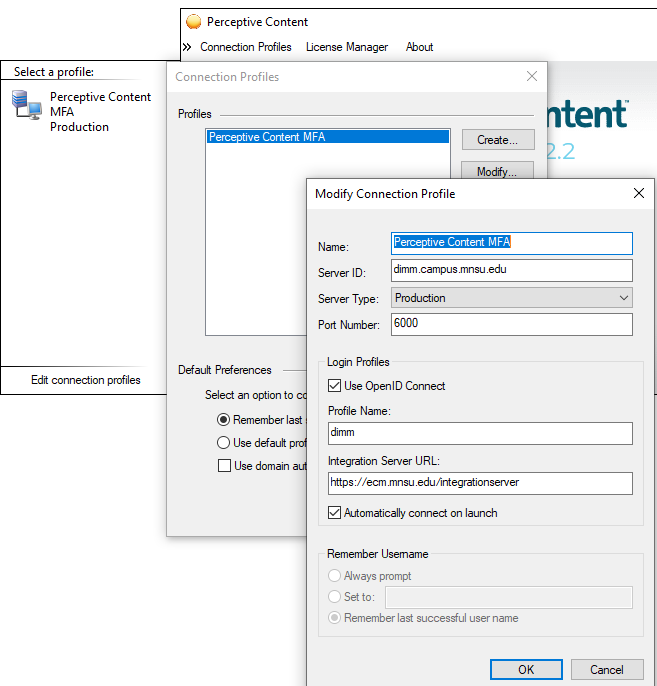
A2: On Campus: Make sure your computer is connected to the internet with an Ethernet cable or SPC-STAFF wifi.
Off Campus: Make sure your computer is connected to the Saint Paul College’s VPN.
Q2: Can’t login to ImageNow. Error Message: “The system cannot establish a connection. Re-enter user name and/or Password.”
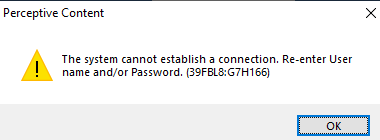
A: Check to make sure your username and password is correct. If it’s still not working, please reset your StarID password (Wait 15-30 minutes) and try again. You'll have to log off your laptop and log in with the updated starid password.
Summary:
- Perceptive Content Login errors, solutions.
Details
Details
Article ID:
2244
Created
Tue 12/24/24 8:17 AM
Modified
Thu 4/16/26 9:53 AM